
Property Management System: From Property Listing to Online Sharing
Helped a multi-branch real estate team build a dedicated listing management back office, integrating case filing, draft review, cross-branch collaboration, permission management, and a showcase-page generator — so even high-information-density listings can be organized, shared, and closed quickly.
Complex information, unified
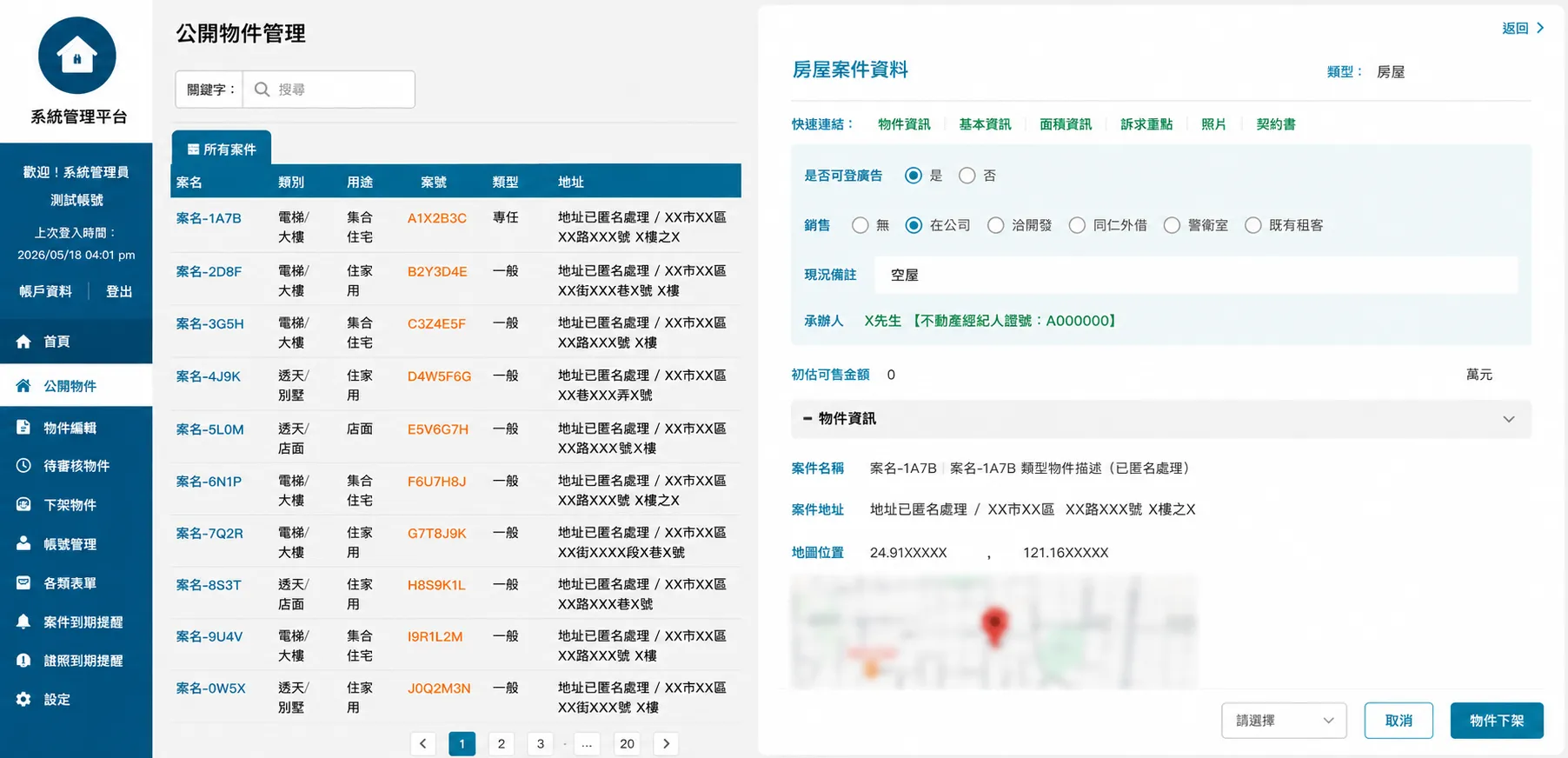
Photos, attachments, and floor plans on one page
Streamlined business workflow
Four-tier permissions and showcase sharing
Unified management across branches
Cross-branch collaboration efficiency
Requirements
Real estate teams handle huge volumes of listing data, photos, attachments, and cross-branch collaboration every day, but traditional workflows still rely heavily on group chats, Excel, and verbal communication. As case volume and branch count grew, problems surfaced — scattered data, tangled permissions, drafts accidentally published, and cases that were hard to track — creating the need for a digital management system that actually matched real estate agents' real-world workflow.
- Listing data, photos, and attachments were scattered across different people and devices, with no unified case management process
- Multi-branch collaboration needed clearly defined permissions — branch managers, admin staff, and agents each needed a different scope of access
- Real estate listings carry a huge amount of information, so balancing complete data presentation with reading efficiency became a central interface design concern
Let's Solve It!
- Built a complete real estate back-office system, integrating listing management, draft management, form workflows, branch management, and account management into one core system
- Established a four-tier account permission structure that matches how real estate organizations actually work, balancing cross-branch visibility with data control
- Separated draft and formal listings into distinct workflows, with a complete filing, review, and publishing process to reduce the risk of accidental publication
- Consolidated case information, photos, floor plans, map location, and attached documents onto a single page, with one-click generation of showcase display pages and print sharing
Case Details
What’s really hard about real estate management isn’t just posting listings
The day-to-day operation of a real estate agency typically involves a large volume of cases, collaboration across multiple roles, and long-term data management all at once.
Agents need to quickly create and update listing data, admin staff need to help organize cases and track progress, and branch managers need real-time visibility into case status and staff activity across every branch. As case volume grows, without a unified back office, data easily ends up scattered across messaging apps, Excel spreadsheets, and different devices — creating sync problems and management risk.
Especially with the high frequency of listing photo uploads, case edits, and cross-branch browsing, the system doesn’t just need to store data — it needs to hold up under the access volume that real operating scale actually generates.
Redesigned around the real workflow
After conducting requirements interviews with the client’s team, Estab-Zenith reorganized the real estate industry’s actual operating workflow and built a back-office management system centered on case management.
The system integrates listing management, draft management, branch management, account permissions, and various form functions, so a case can go from creation, editing, and review to formal publication — all within a single platform.
The listing management page uses a highly information-dense design, consolidating case information, property condition descriptions, floor plan data, map location, photos, and attached documents into a single interface. Combined with a block-based, collapsible layout, it maintains good readability and usability even with a large amount of information on screen.
The draft listing mechanism separates unfinished cases from formally published listings, reducing the risk of accidental publication or editing, while making the internal review process clearer.
A four-tier permission structure that matches how the organization actually runs
The system establishes a four-tier account permission structure based on real operating needs:
- System administrator: manages all accounts and data across the entire system
- Branch manager: manages branch staff and branch cases
- Admin staff: assists with case data and day-to-day administrative processes
- Agents: manage the case data they’ve personally created
By separating roles and permissions, the system balances cross-branch information sharing with clear accountability for data editing, avoiding the data chaos that can arise from multi-person collaboration.
The system also supports unified management across multiple branches, and can continue to scale if new locations are added or the organizational structure changes in the future.
One-click showcase pages, getting listings into circulation fast
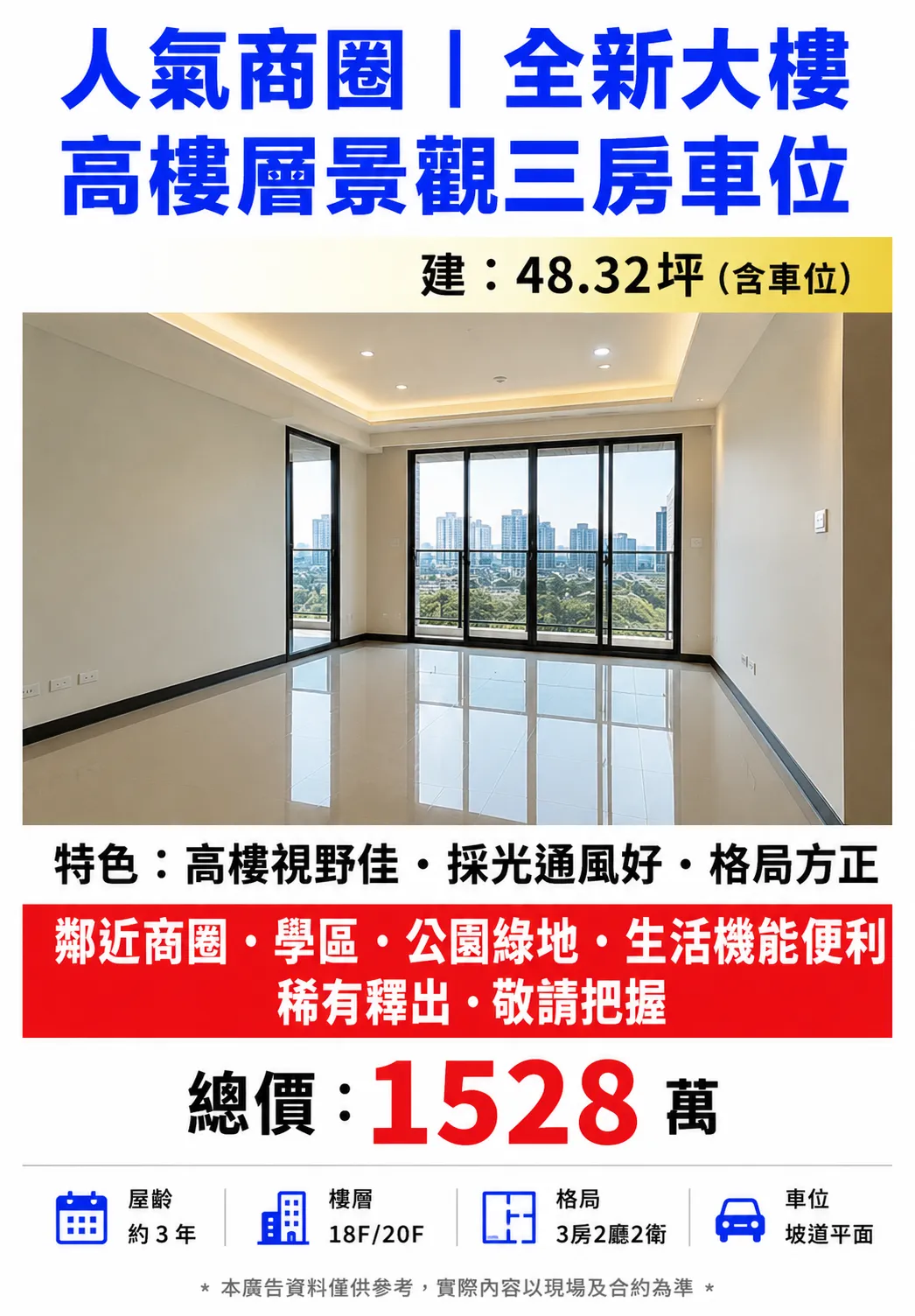
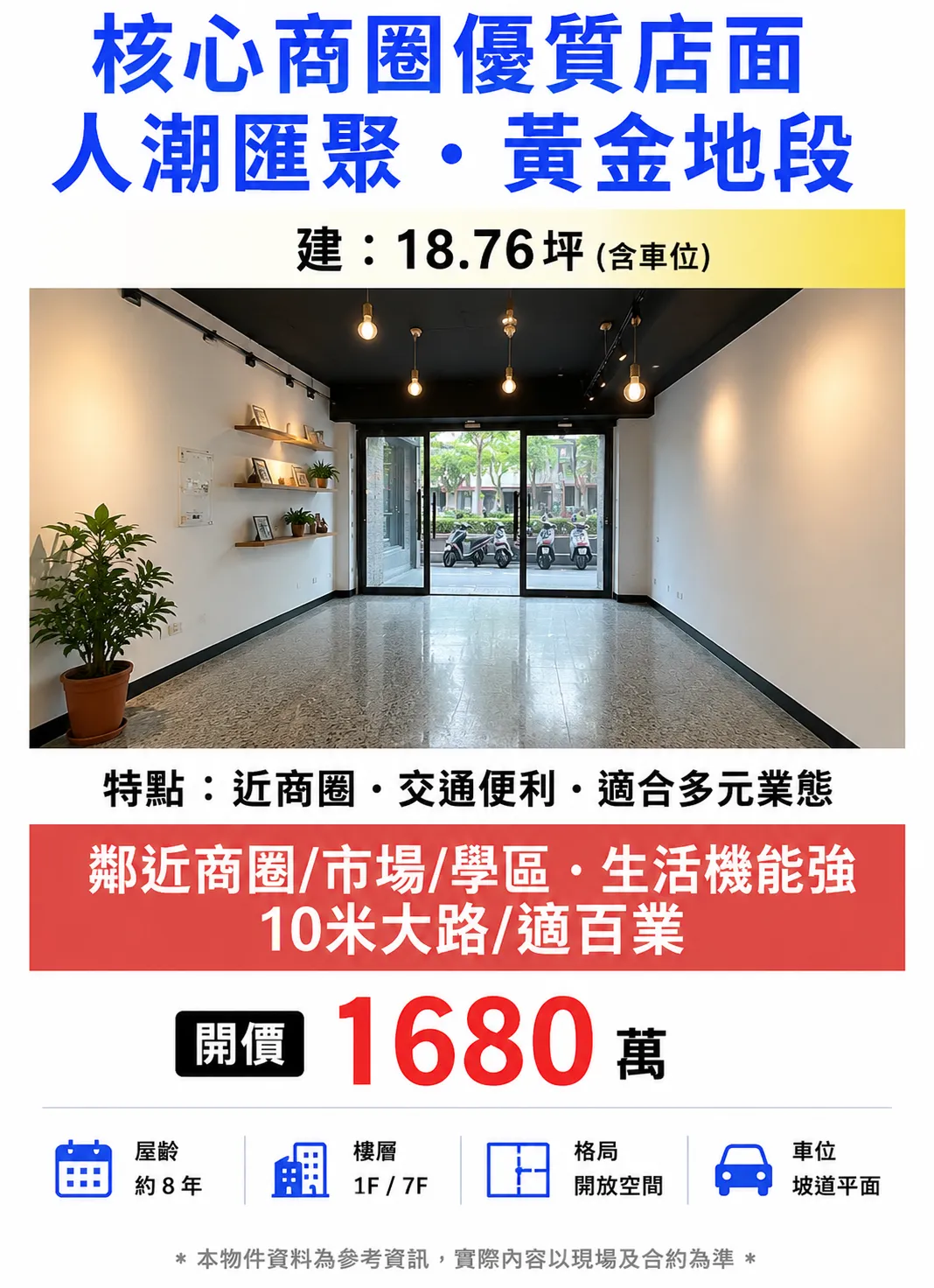
Beyond back-office case management, the system also supports automatically generating showcase display screens — taking case data, photos, pricing, and feature copy that would otherwise be scattered, and automatically organizing them into a visual layout suited for public display.
Agents don’t need any additional design software — they can quickly produce a printable, shareable, forwardable listing showcase page for use in storefront window displays, social media sharing, messaging app forwards, and in-person presentations.
The layout supports high-resolution images, large headline text, and integrated feature highlights and pricing information, so a listing can go public quickly while maintaining brand consistency and visual quality.
For teams updating listings frequently, this also significantly cuts down on repetitive layout work and manual graphic design costs, letting agents focus more on managing cases and communicating with clients.
Continuously refined based on real usage
After the system officially launched, the team has continued adjusting and optimizing features based on real-world usage patterns.
This includes search flow optimization, listing field adjustments, high-traffic image access optimization, and special data handling for different property types — all continuously improved through iterative releases.
As case volume and image data keep growing, the system’s cloud resource allocation and access architecture have been adjusted in parallel, ensuring day-to-day operational stability and load performance.
Technical architecture
- Cloud environment: Google Cloud Platform
- Database: Cloud SQL
- Domain & security: Cloudflare SSL encryption
- Scope of work: UI/UX planning, system architecture design, permission design, front-end and back-end development, ongoing operations
The core lesson from this project
The value of a custom-built system lies in how closely it fits the actual workflow.
Compared to a generic off-the-shelf back office, the biggest value of a custom platform is that it can be designed around the organization’s real structure and working logic.
From the permission structure and draft workflow, to multi-branch management and how a high-information-density case page is read — every feature was planned around real usage scenarios, rather than forcing the team to adapt its workflow to fit an existing piece of software’s limitations.
For a team that needs to manage a large volume of cases, collaborate across multiple people, and keep scaling over the long term, the system isn’t just a data tool — it’s part of day-to-day operations itself.
Related Case Studies
Enterprise Systems
Decathlon Sports Club: A Global Platform Connecting Three User Groups
A nationwide sports experience registration platform built for Decathlon Taiwan, integrated with the brand's global membership and payment systems. It unifies internal staff, partner coaches, and members into one platform — covering discovery, registration, and venue booking end to end — backed by a long-term operations model.
Enterprise Systems
Healthergo (PT Official Website): A Personal Branding Website for a Physical Therapist
Physical therapist Jane doesn't just provide physical therapy — she also works as a corporate coach and mentor to fellow practitioners. Her official brand site needed to bring together visual identity, service flow, and a blog to present the trustworthy side of Healthergo.
Enterprise Systems
INEN E-Bike Travel Official Website: Self-Service Blog Management and Cloud Infrastructure
Built a WordPress official blog for the INEN e-bike rental and travel app, providing web brand design, cloud infrastructure, and data redundancy — a complete official-site foundation that stays reliable from content publishing to day-to-day operations.
You can get results like this too!
Start with AI requirement analysis and turn your idea into a concrete requirements draft.
Start My AI Analysis